Opening a RoboForex account
To get an AI advisor for free, open a live RoboForex account under partner code dtas. The advisor will be bound to this account and trade only on it.
Recommended account parameters
Copy these values when filling out the registration form.
- Account type
- Real
- Trading platform
- MetaTrader 5
- Account Type
- MT5 ProCentmust be ProCent
- Hedge system
- Yes
- Currency
- USD
- Leverage
- 1:500 — 1:1000
- Minimum deposit
- $100
- Partner's Agent ID
- dtasrequired
Conditions to receive a free advisor
Meet all the points below and get the advisor for free after account verification.
- Partner code: dtasAgent ID in the registration form
- Account type: Real MT5 ProCentUSD, Hedge, leverage 1:500–1:1000
- Minimum deposit: $100Top up the verified account
- Get the advisor: TelegramSend account number to @teamai_bot
Check the partner code
Paste the value from the Partner's Agent ID field of the registration form — we'll tell you right away if something is off.
Enter the Partner's Agent ID from the registration form. It must be exactly: dtas.
- • Lowercase Latin letters only
- • Exactly 4 characters: d-t-a-s
- • No spaces or extra symbols
- • Case matters: DTAS ≠ dtas
Step-by-step
- 01
Go to the RoboForex website
Open the registration page via our partner link — the Team AI code is already applied.
- Click Open a RoboForex account below (opens my.roboforex.com in a new tab).
- Check the URL contains ?a=dtas — that's our partner tag.
- Don't close the tab: you'll return here to compare parameters.
my.roboforex.com/en/?a=dtasOpen Account - 02
Fill out the account opening form
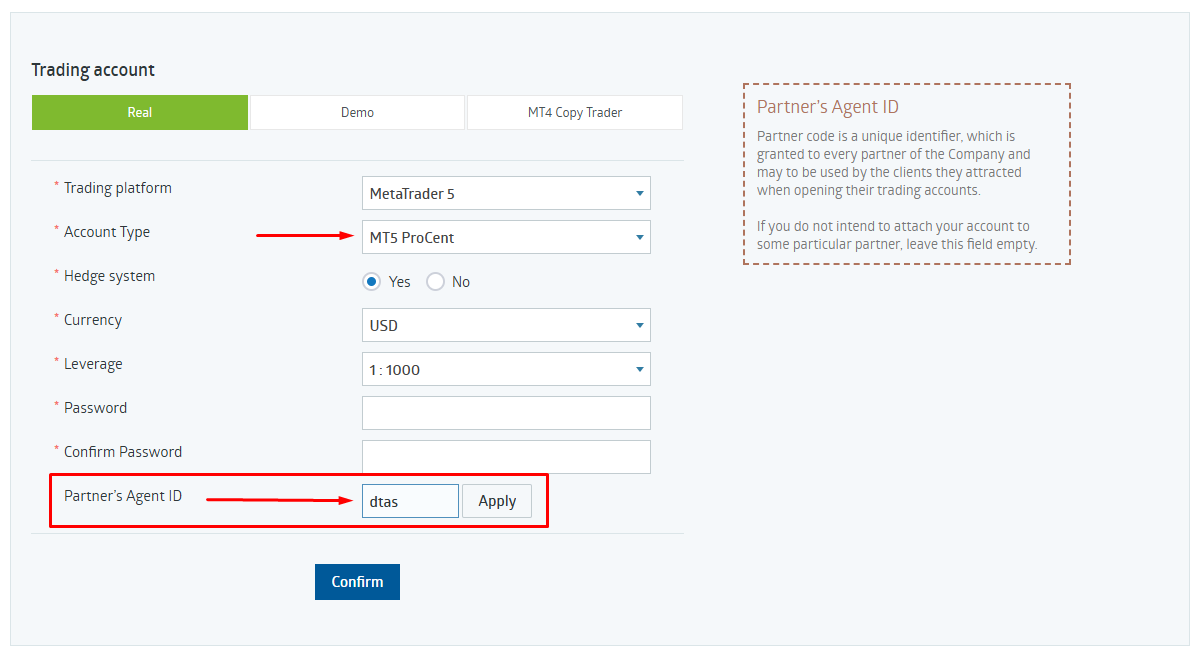
Pick a Real account and copy the parameters from the table above.
- Account type: Real (not Demo).
- Trading platform: MetaTrader 5.
- Account Type: MT5 ProCent — this is required for the advisor.
- Hedge system: Yes · Currency: USD · Leverage: 1:500–1:1000.
- Create a password and confirm it.
Account typeRealPlatformMetaTrader 5Account TypeMT5 ProCentCurrencyUSDLeverage1:500 - 03
Make sure Partner's Agent ID = dtas
This is the most important field. Without it the advisor won't be available.
- Scroll down to Partner's Agent ID.
- If it's empty, type dtas manually.
- Press Apply — the field should turn green / show a checkmark.
Partner's Agent IDdtas✓ - 04
Confirm and pass verification
Finish registration, then verify your identity inside the client area.
- Press Confirm to create the account.
- Open the confirmation email from RoboForex and click the link.
- In Settings → Verification, upload your ID and proof of address.
- Wait for the Verified badge (usually a few hours).
✓Email confirmed✓ID uploaded✓Proof of addressVERIFIED - 05
Fund the account with at least $100
Deposit a minimum of $100 — enough to run the advisor on MT5 ProCent.
- In the client area go to Deposit.
- Select your MT5 ProCent account as the destination.
- Pick a payment method (card, crypto, bank).
- Deposit $100 or more and wait for the balance to update.
Deposit amount$100CardCryptoBank - 06
Send the account number in Telegram
We check that the account is under partner code dtas and send you the advisor.
- Open @teamai_bot in Telegram.
- Send your MT5 account number (8 digits).
- Receive the advisor file (.ex5) and setup guide bound to your account.
@teamai_bot12345678✅ Account verified. Advisor: TeamAI.ex5
If you already registered at RoboForex before, and not under our partner code, open a new sub-account and enter Partner's Agent ID dtas — or message us in Telegram and we'll help.